Responsible Person - Adding Products to Expandly
Overview
To progress with your Responsible Person (RP) service, we will require you to add the Parent SKU information into your Expandly portal for all products that you wish us to represent.
Once these SKUs have been added to your account, the system will automatically specify which documentation is required from you, based on the relevant product category(ies).
This guide will walk you through:
How to create these products within Expandly
How to add them to your Responsible Person (RP) service
Adding products to Expandly
1. Log in to your Expandly Portal
2. Click Compliance > Responsible Person (left Navigation Menu):
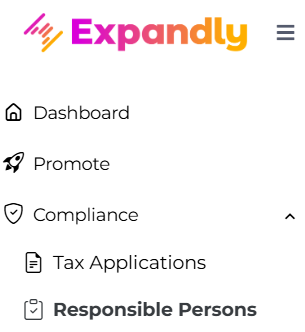
3. On your Responsible Person page, click 
4. On your Responsible Person - Add Product pop up, click
5. On your Add Products pop up, enter the SKU and Title information (you can also add EAN/UPC details but this is optional):
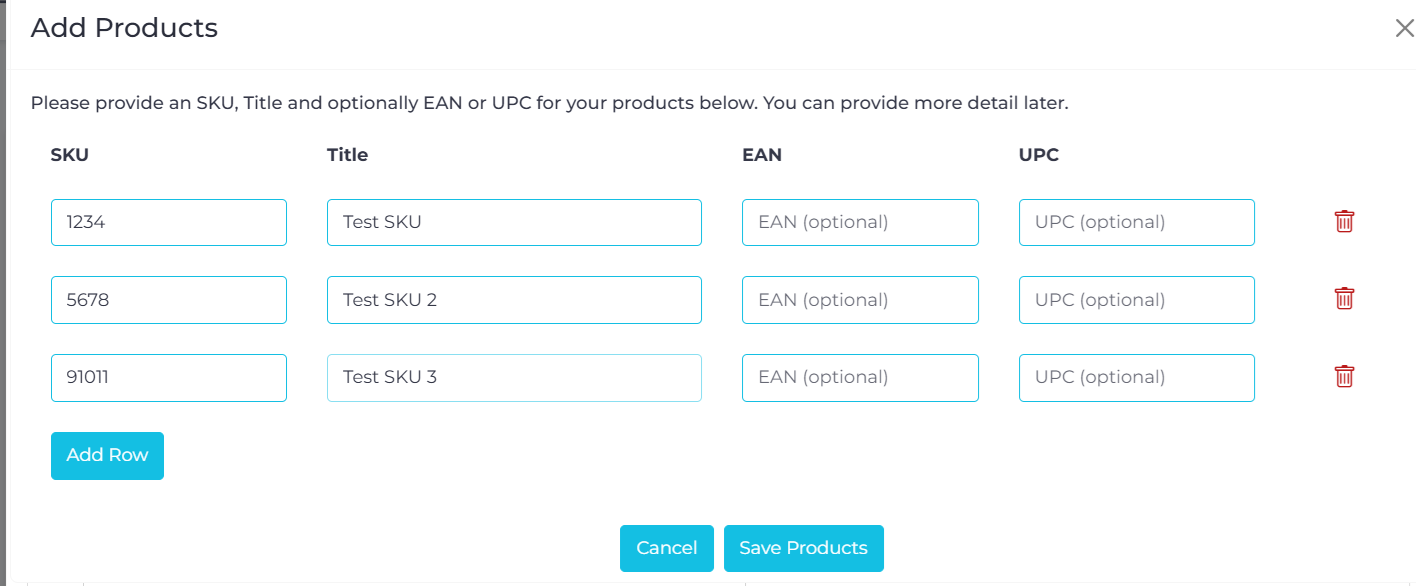
Please Note:
- If you have more products to be added, please click
to create additional lines as needed
- As standard, you can add up to 30 parent SKUs - if you would like Expandly to represent you for more than 30 products, please reach out to your BDM, who would be happy to discuss these requirements with you
- You will only need to provide Parent SKU details. If there are variation SKUs, these do not need to be added to the portal as we will not be required to review or approve documentation at variation-level
6. Once you have added all products, click 
Adding products to RP in Expandly
1. Once products have been added to Expandly, on your Responsible Person - Add Products pop up, you can view a list of your created SKUs:
2. Using the tick box, select the SKUs that you wish to add to Responsible Person (RP). These will then appear in the section underneath the product table list:
3. From the drop-down, select the applicable product category for each SKU and once this has been done, click
4. You will then be returned to your main Responsible Person page, where you can view the products you have already added. From here you can begin providing all required documentation for approval, which will become visible when you extend the drop-down 
5. For more information on how to upload RP Documentation, please click here
You can also access our RP FAQs here
Need more help?
If you need more help, no problem. Contact Us and we'll be happy to help!